
 Free on Mac, Windows and Linux
A crypto portfolio tracker that runs on your computer, not on ours
Your coins are spread across exchanges and wallets, and most trackers will only add them up if you hand over an API key or make an account.
Moonitor keeps the whole portfolio in files on your own machine, and still tells you what you really made.
- No account
- No tracking
- No ads
- No API keys

- BTC––
- ETH––
- SOL––
- XRP––
- DOGE––
- ADA––
- exchanges
- 16exchanges
- API keys
- 0API keys
- accounts
- 0accounts
- trackers
- 0trackers
The usual deal
Seeing your own net worth should not cost you your privacy
The usual tracker
Moonitor
An account, with an email and a password
No account. Download it and start.
A read-only API key to your exchange
Never asked for. You record what you hold.
Your balances, on their server
In files on your own computer.
A monthly subscription to see your own numbers
Free. Pro is $9.99 once, if you want it.
Analytics and ad SDKs watching you use it
None. No tracking, no ads.
A day at your desk
Six moments, and not one of them on someone else's server
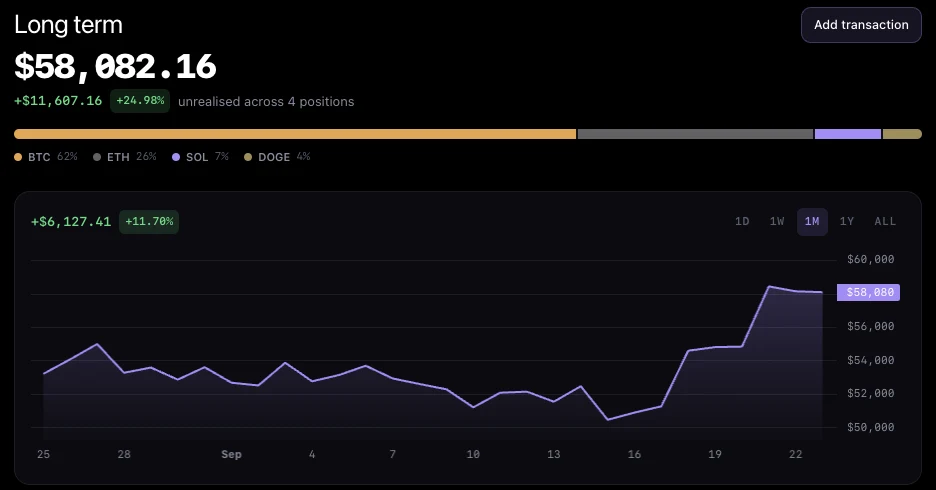

Everything, in one total
08:55
The first number of the day
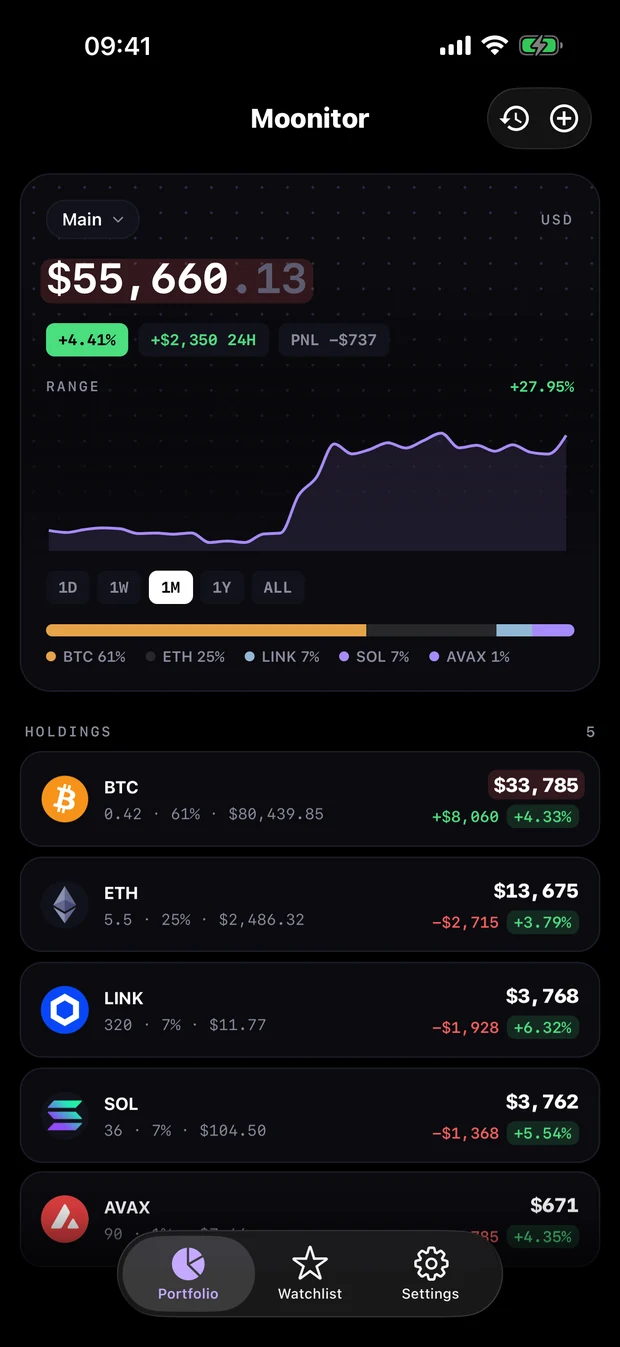
Exchanges, wallets and cold storage in one total, because you record what you hold instead of connecting accounts. The line is what you really held each day, so it agrees with the figure above it.
10:05
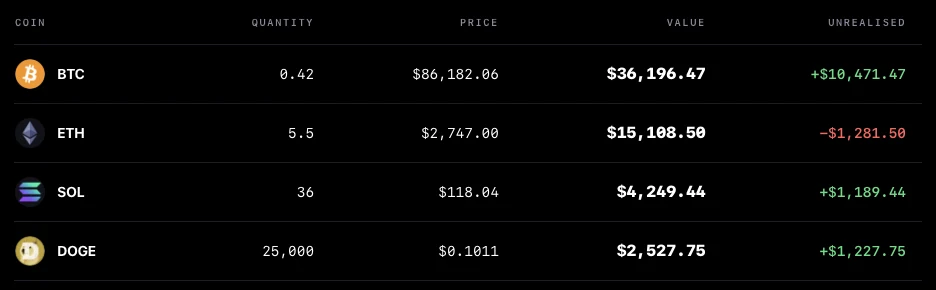
One row per coin
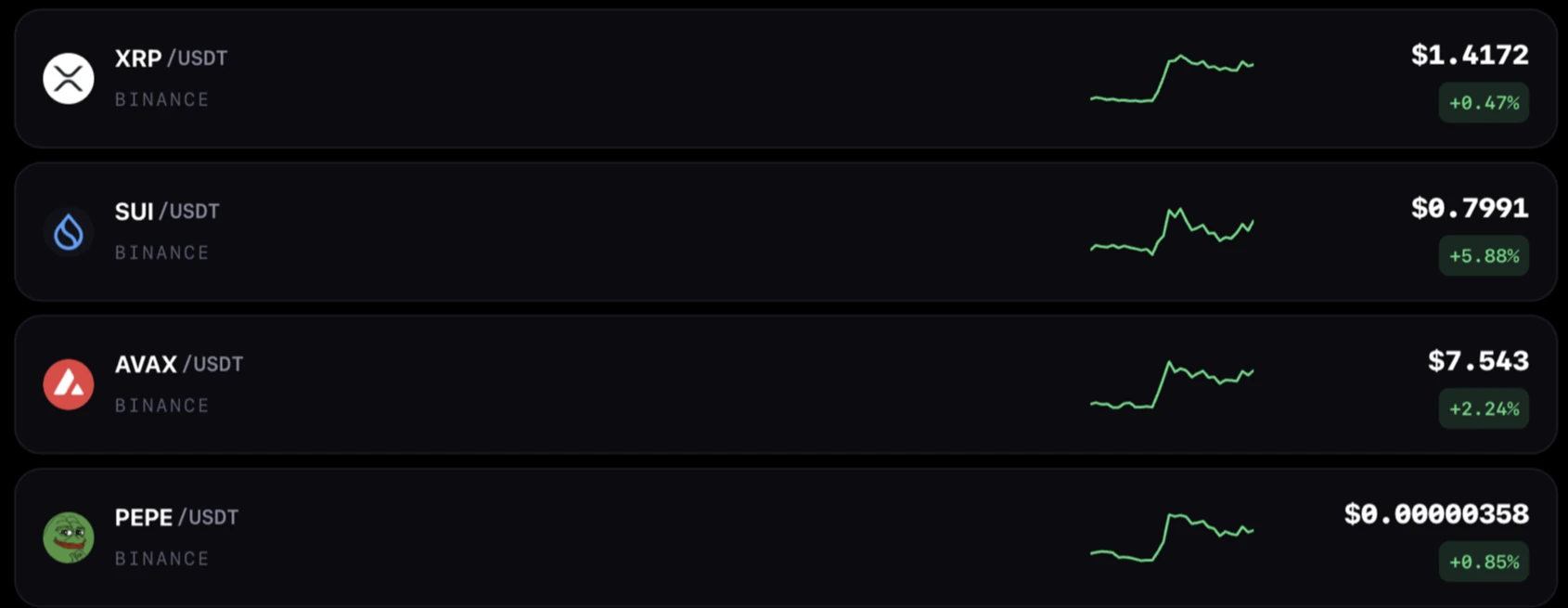
How much you have, what it costs right now, what it is worth, and whether you are up or down on it. Priced live from the exchange you picked for that coin.
11:30
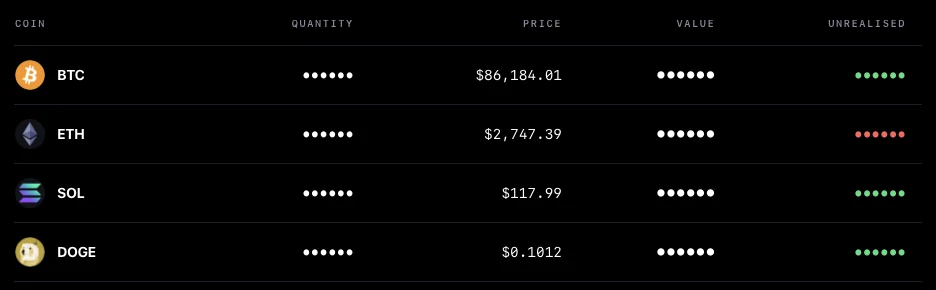
The screen share
Your turn to present, and the tracker is still open. One switch turns your holdings into dots and leaves the prices showing, so the room can read the market and not your position.
14:10
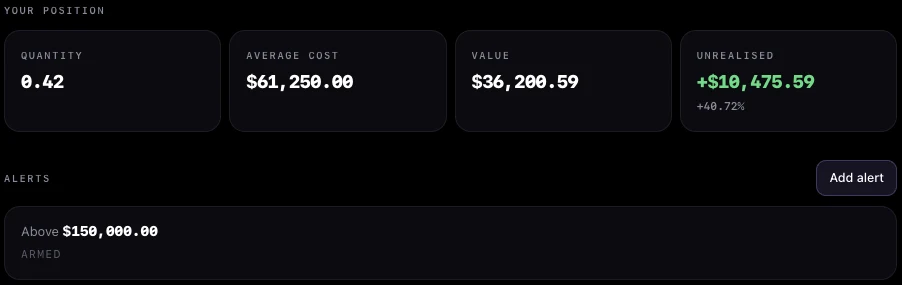
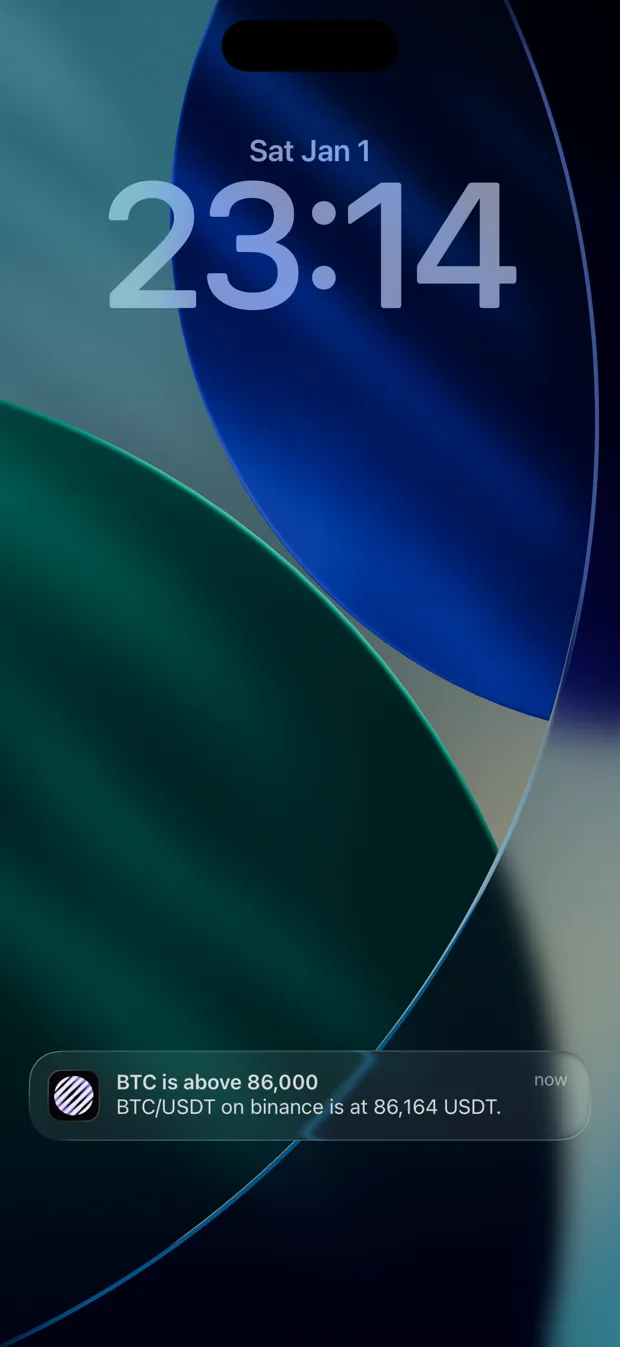
The alert, mid-meeting
You set a level last week and forgot about it. Your own computer has been watching, and the notification arrives the moment the price crosses. Nothing about what you hold left the machine to make that happen.
16:20
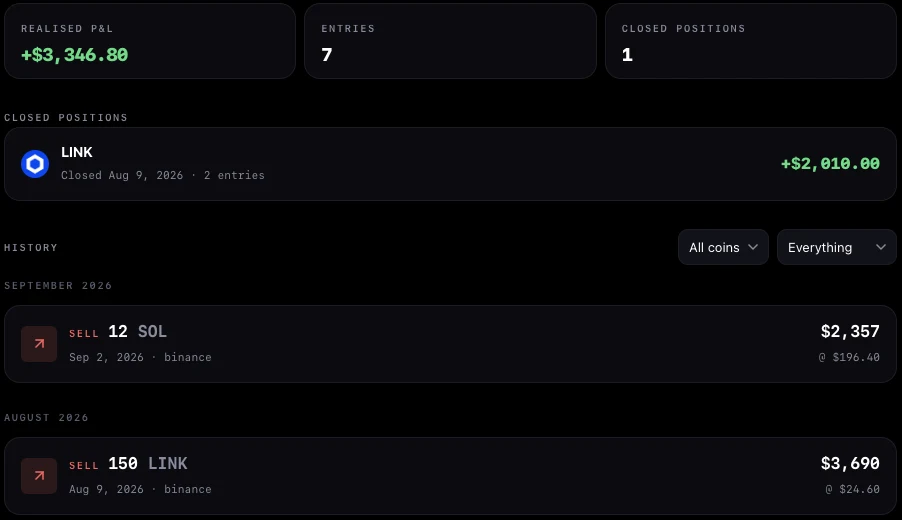
What you already took off the table
Buys, sells and transfers by month. Positions you have closed sit at the top with the profit you really made on each, so money already banked is not lost inside a single total.
23:14Pro
Away from the desk
The laptop is shut. Moonitor for iPhone picks the same alerts up and delivers them with the app closed, and the service that watches for you is told a market and a number, never your holdings.
Honest returns
The percentage most trackers show you is flattering
Our own chart did this before we fixed it: one purchase in the middle of the month came out as up 750%, nearly all of it money going in.
This month
+750%
The deposit is counted as performance. You put money in and the app calls it a gain.
An example portfolio. Tap the two ways of measuring it.
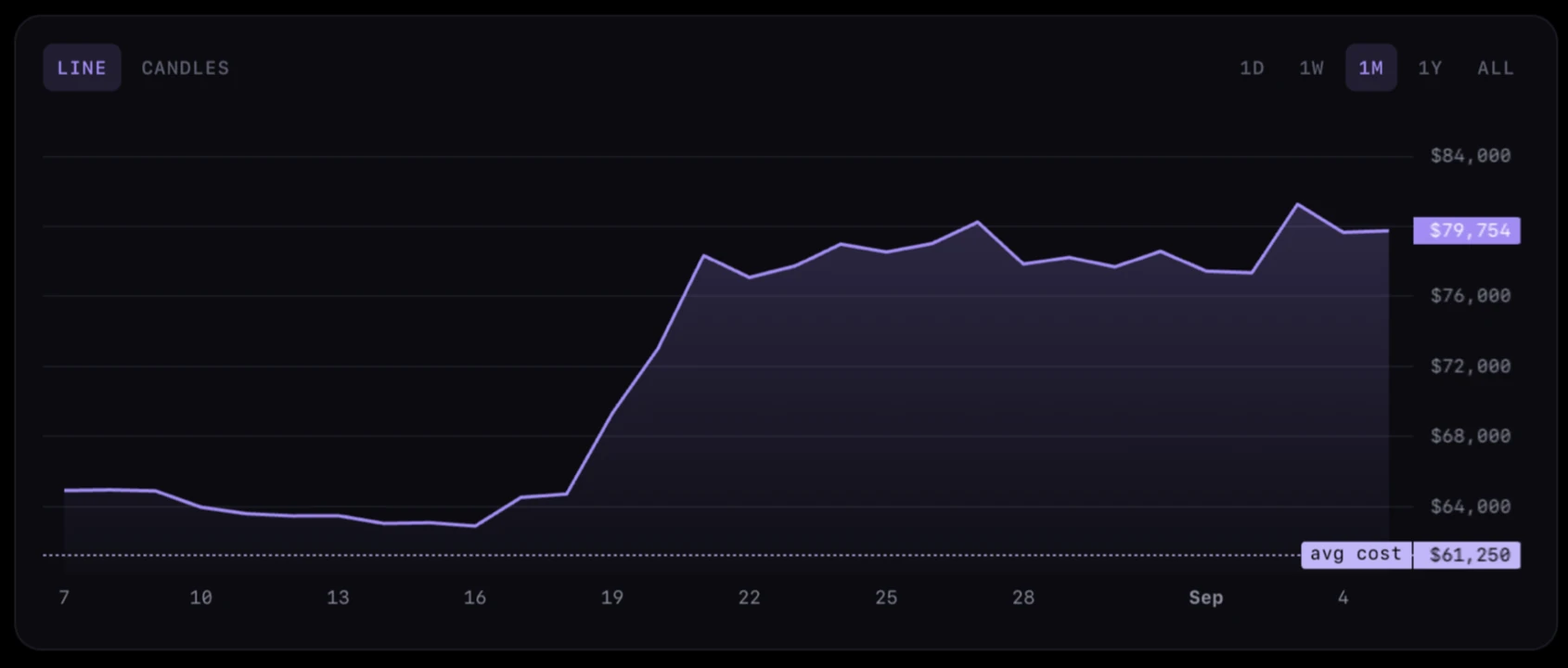
Every coin carries what you paid on average, drawn onto its chart, so the gap between that line and today is a distance you can see.
Where it lives
Everything that leaves your computer, in full
Stays on your computer
- What you hold, and how much
- Every buy, sell and transfer
- What you paid
- Your profit and loss
- Your portfolios and their names
Sync is yours to choose: iCloud from the Mac App Store, or a folder you already sync with Dropbox, OneDrive, Google Drive or Syncthing. Either way it only travels between your own devices.
The exchange you picked
BTC/USDT
Asked what a coin is worth. Never told what you own.
Anything about what you own
Goes nowhere. There is no Moonitor account for it to be attached to, and no API key that could trade or withdraw.
In practice
The parts you only notice when they are missing
A watchlist that is not a portfolio
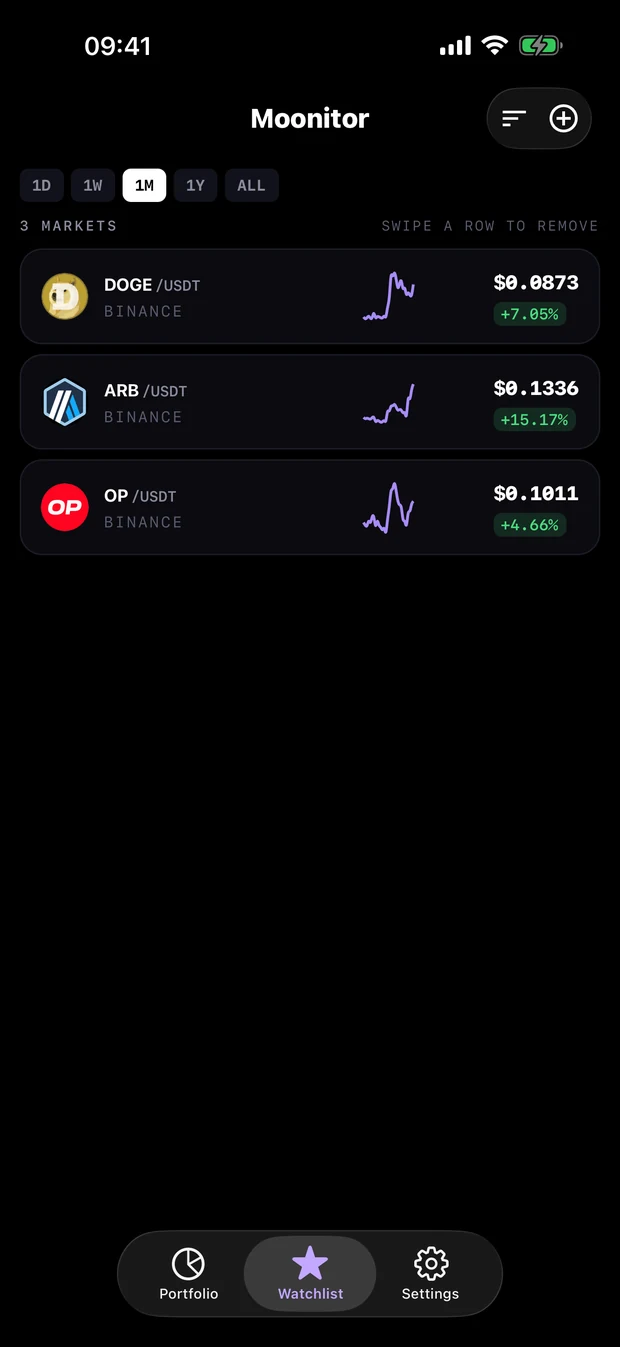
Follow a coin without pretending to hold it. The watchlist is separate from every portfolio, so switching or deleting one leaves it alone. Sort by gain, by fall or by hand.
Your money, in your money
Each portfolio has its own currency, and changing it recalculates every total, profit included. Count in dollars, euros, or Bitcoin.
- USD
- EUR
- GBP
- CHF
- JPY
- AUD
- CAD
- BRL
- TRY
- BTC
- ETH
A line or candles
A line shows the trend, candles show what the day actually did. Switch on any coin, over a day or over five years.
- 1D
- 1W
- 1M
- 1Y
- ALL
Live prices from the exchange you actually use
Every coin is priced through one market you choose, and you can change it whenever you like. Public prices: no API key, and no way to touch your exchange account.
- Binance
- Binance US
- Bitget
- Bybit
- Coinbase
- Crypto.com
- HTX
- Kraken
- KuCoin
- OKX
- Bitfinex
- Bitstamp
- Bitvavo
- Gate
- MEXC
- Poloniex
More in the guide to supported exchanges.
Sync it the way you already sync everything
From the Mac App Store, iCloud keeps your Mac and your iPhone in step through your own private container. Anywhere else, point Moonitor at a folder in Dropbox, OneDrive, Google Drive or Syncthing. Edit on two machines at once and the two are merged, not overwritten.
Take it with you
Export the whole thing to a file whenever you like, and import it on another machine. Your data, in a format you can read.

Download
Works on Mac, Windows and Linux
Free to download on all three. Nothing to sign up for.
Latest release 4.0.1
macOS
macOS 12 or later. Apple Silicon and Intel.
A link not working? Browse every release, or get it from the Mac App Store.
Pricing
Free to use. $9.99 once to lift the limits.
| Feature | Free$0 | Pro$9.99 once |
|---|---|---|
| Live prices from 16 exchanges | ||
| Transactions recorded | Unlimited | Unlimited |
| Sync, and backups you can export | ||
| Hide balances | ||
| Coins tracked | 5 | Unlimited |
| Portfolios | 1 | Unlimited |
| Watchlist markets | 10 | Unlimited |
| Price alerts | 1 | Unlimited |
Three ways to get Pro
From the Mac App Store
Buy it inside the app. It is the same purchase as the iPhone app, so if you already bought Pro there, it is already yours here.
From Setapp
Pro is included. Nothing else to buy.
Downloaded from this site
Buy a key here and paste it into Settings. It is checked on your own machine, so the app never has to phone home to let you in.
Bought Moonitor before it became free? Pro is already yours.
Questions
Frequently asked
Is Moonitor free?
Yes. The app is free to download and free to use, with live prices, sync and unlimited transactions. Moonitor Pro is $9.99 paid once, not a subscription, and it lifts the limits on coins, portfolios, watchlist markets and alerts.
Does Moonitor work on Windows and Linux?
Yes. There are builds for macOS 12 and later, Windows 10 and later, and Linux as a .deb, .rpm or AppImage. It is the same app on all three.
Do I need an account?
No. There is no sign-up and no login. Your portfolio is stored on your own computer, and there is no Moonitor server holding your balances.
Does Moonitor connect to my exchange account?
No, and it never asks for an API key. You record what you bought or sold yourself, and Moonitor prices it using public market data. Nothing can be traded or withdrawn through the app.
Do price alerts work when the app is closed?
Moonitor watches the market while it is running and tells you the moment your price is crossed, which is what a machine that stays on all day is good for. Nothing about your holdings leaves the computer to make that happen. Away from your desk, Moonitor for iPhone picks the same alerts up and delivers them there.
Can I use it on my Mac and my iPhone?
Yes. The Mac App Store version syncs with the iPhone app through your own private iCloud container. You can also point Moonitor at a folder in Dropbox, OneDrive, Google Drive or Syncthing, and every device watching that folder stays in step.
Which exchanges does it support?
Binance, Binance US, Bitget, Bybit, Coinbase, Crypto.com, HTX, Kraken, KuCoin, OKX, Bitfinex, Bitstamp, Bitvavo, Gate, MEXC and Poloniex. Every coin is priced through a market you choose, and you can change it at any time.
The same tracker, in your pocket
Moonitor for iPhone is free, keeps your holdings on your device, and tells you when a market hits your price even when the app is closed.
- Alerts that watch the marketSet a price and Moonitor tells you when the market gets there. Only the market and your target are ever sent, never your holdings.
- Nothing leaves your phoneNo account, no tracking. Your holdings are stored on the device and synced through your own iCloud.
- Home screen widgetYour total and today's move on the home screen, with Pro.
Free to use, with an optional one-time Pro unlock

Find out what you actually made
Free on Mac, Windows and Linux. No account, no API key, and every figure stays on your own machine.
Download MoonitorAlso free on iPhone, with alerts that watch the market, never your portfolio.