
 Version 2.0 on the Mac App Store
The Bitcoin price and the fee, without opening anything
Checking the price means a tab you did not mean to open. Checking the fee means a block explorer and a number in sat/vB.
LilMoon keeps both on your desktop and in your menu bar. You just look.
- No account
- No tracking
- No ads
- No server
- once
- $2.99once
- accounts
- 0accounts
- presets
- 12presets
- effects
- 16effects
- currencies
- 18currencies
A day with LilMoon
Four glances, and not one tab

Nothing opened, nothing to close
08:10
The glance
The price in your currency, the 24 hour change beside it, and a line drawn from where the day opened, so the two never disagree. You look at your own screen and you are done.
11:40
The fee, in money
Sat per vByte is a unit almost nobody thinks in. Two and sixty are the same transaction, thirty times apart. LilMoon shows the fastest rate in sat/vB and in your own money, coloured cheap or dear.
15:05
The alert
Waiting for the mempool to calm down means checking more often, not less. So LilMoon watches instead, and tells you when the fee drops below the number you picked.
19:30
The menu bar
The price, the fees, or just the icon, up in the menu bar. Switch the desktop window off entirely if that is all you want.
Appearance
Anything that sits on your desktop all day has to look like it belongs there
Preset
Effects
Eight of the sixteen, drawn by your browser. The app adds sheen, emboss, bloom, iridescence, halftone, CRT curve, lens fringing and the glitch.
The glance
Looking is free. Checking is not.
Opening a tab to see one number puts you in a tab. Ten minutes later you have read three things you did not go there for.
LilMoon is already on the desktop. Nothing opened, nothing to close.
Underneath, if you want them: the latest block and how long ago it landed, the mempool backlog, the next difficulty retarget and the next halving. Every row is a switch.
Alerts
Be told, instead of watching
Waiting for a level means checking, which is the thing you were trying to stop doing.
Set rules on the price, the 24 hour change, the fastest fee or the economy fee, above or below a number you pick. Each carries its own cooldown, so a market sitting on your number does not nag you all afternoon.
Tell me if it moves five per cent either way stays true as the price drifts. A price threshold has to be retyped every few months.

In practice
The parts you only notice when they are missing
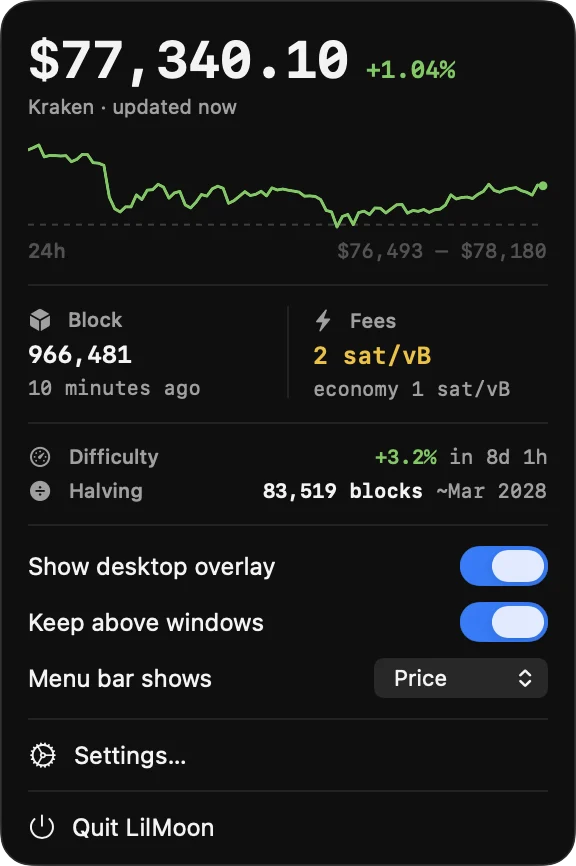
The menu bar popover
The sparkline, the block, the fees, the retarget and the halving in one place, with the overlay toggles beside them.
Fees in your money
The fastest and economy rates in sat/vB and in your own currency, so you know what a transaction costs before you build it.
Four price sources
Prices from the exchange you pick. Blocks and fees from mempool.space.
- Binance.com
- Binance.us
- Kraken
- Coinbase
Priced in the money you actually spend
Eighteen currencies, and which you can pick depends on the exchange. Public market data: no API key, and no way to touch an exchange account.
- US Dollar
- Euro
- Pound Sterling
- Japanese Yen
- Swiss Franc
- Canadian Dollar
- Australian Dollar
- Indian Rupee
- Turkish Lira
- Brazilian Real
- Mexican Peso
- Argentine Peso
- Polish Złoty
- Romanian Leu
- Ukrainian Hryvnia
- South African Rand
- USD Coin
- Tether
No server, no account
Nothing is routed through a server of ours, because there is not one. No sign-up, no analytics, no ads. LilMoon has no idea who you are, and asks for nothing but a network connection.
Where you put it
On the desktop below your windows, or above them if you prefer. Drag it anywhere and it stays put between launches. Turn on open at login and it starts when your Mac does.
New in 2.0
What changed in this release
Twelve appearance presets
Classic, Bare light, Bare dark, Terminal, Ticker, Night City, Synthwave, Paper, Sakura, Candy, Sky and Seaglass. The two bare ones draw no panel at all, so the figures sit straight on your wallpaper.
Sixteen effects, each one a switch
Frost, rim light, sheen, glow, emboss, bloom, chromatic split, iridescence, scanlines, grain, halftone, CRT curve and lens fringing. Three of them move, so the price can flash as it changes, roll digit by digit, or tear like a bad signal.
Alerts on more than fees
Rules now watch the price and the 24 hour change as well as the fastest and economy fees, each one with a cooldown of its own.
A 24 hour sparkline
A line under the price with a dashed rule at the level the day opened. It is measured from that same open, so it never disagrees with the percentage above it.
Fees in context
Fees can be coloured by where they sit in their own recent range, so a glance says cheap or dear without remembering what last week looked like.
Kraken and Coinbase
They join Binance as price sources, and bring Pound Sterling, Swiss Franc, Canadian and Australian Dollars and the Indian Rupee with them.
Settings rebuilt around a sidebar
Eight panes instead of two tabs, every alert on a card of its own, and both Settings and Alerts now open from the overlay's own right-click menu.
More in the menu bar popover
The difficulty retarget and the date of the next halving now sit alongside the price, the block and the fees.
Which one
LilMoon or Moonitor?

LilMoon
A glance
Bitcoin only, no portfolio, one question: what is happening right now. A widget you leave on your desktop and mostly ignore.

A portfolio tracker
Sixteen exchanges, what you hold and what you paid, and your profit and loss. An app you open when you want to know how you are doing.
Both are made by the same person, both keep your data on your own machine, and neither asks for an exchange API key.
Questions
Frequently asked
Is LilMoon a subscription?
No. LilMoon is $2.99 once on the Mac App Store. There is no subscription, no upgrade tier and nothing to unlock later.
What does LilMoon need to run?
A Mac on macOS 15 or later. The build is universal, so it runs natively on both Apple silicon and Intel.
Do I need an account?
No. There is no sign-up, no login and no analytics. LilMoon stores your preferences on your Mac and asks for nothing but a network connection.
Where do the numbers come from?
Prices from Binance.com, Binance.us, Kraken or Coinbase, whichever you pick. Blocks and fees from mempool.space. Nothing is routed through a server of ours, because there isn't one.
Does the widget sit on top of my windows?
Only if you want it to. By default it sits on the desktop below your windows. Turn on keep above other windows and it floats over everything, and you can drag it anywhere you like. It stays put between launches.
Do alerts work when LilMoon is closed?
No. LilMoon checks every 30 seconds while it is running, so alerts stop when you quit or restart your Mac. Turn on open at login and it starts when your Mac does.
Does LilMoon track my portfolio?
No. LilMoon follows Bitcoin only and holds no holdings, no transactions and no balances. Moonitor is the portfolio tracker; LilMoon is the glance.

It pays for itself the first time you wait for a cheaper fee
$2.99 once, on the Mac App Store. No account, no subscription, and nothing about you leaves your Mac.
Get LilMoon on the Mac App StoreTracking a whole portfolio instead? Moonitor is the one you want.